Slash commands
Built-in commands, how bots publish their own, options, private answers and a complete example.
Type / in a server channel to see the commands you can use. The list mixes the built-in commands with those published by bots. On the phone interface, matching commands appear as chips above the composer.
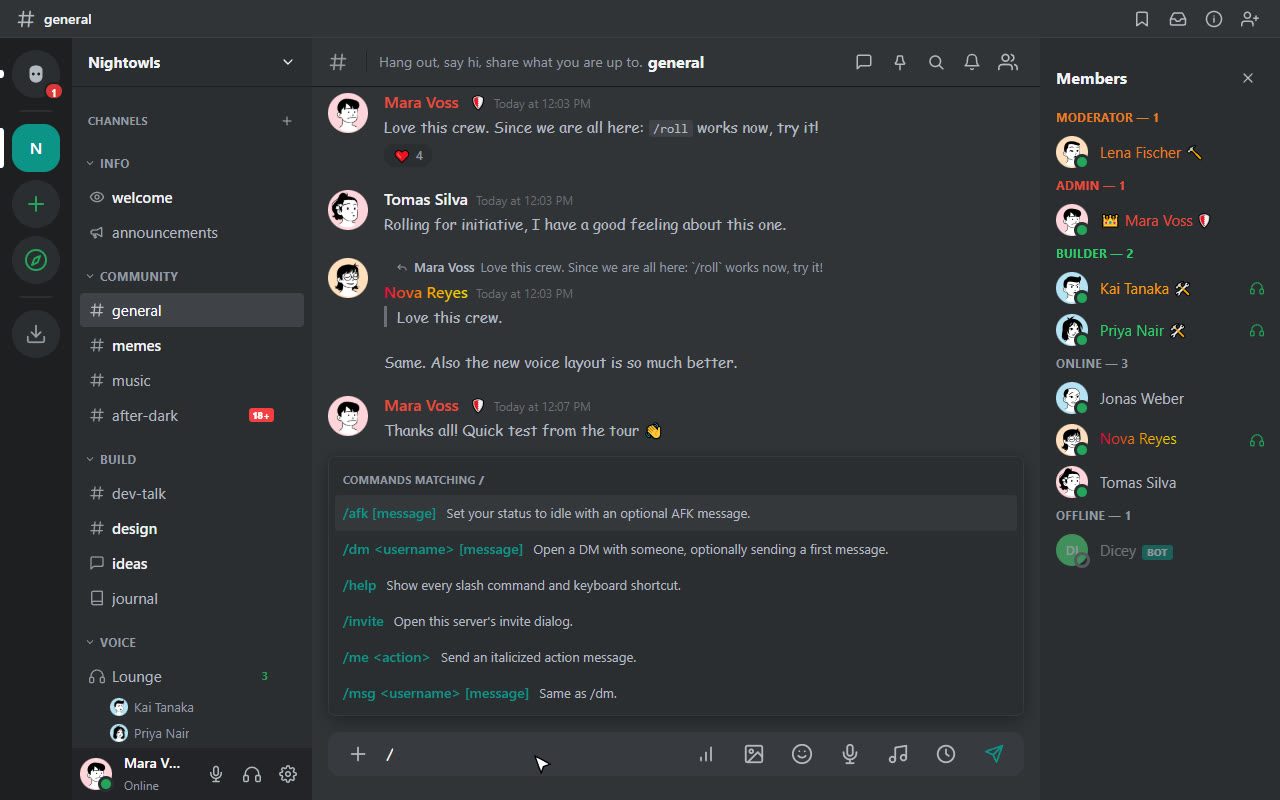
Built-in commands
| Command | Does |
|---|---|
/me <action> | Posts an action in italics |
/nick [name] | Changes your nickname on this server |
/shrug, /tableflip, /unflip | Adds the classic text faces |
/spoiler <text> | Posts text hidden behind a spoiler |
/thread <name> | Starts a thread |
/topic [text] | Shows or sets the channel topic (with permission) |
/dm, /msg <username> [message] | Opens or writes a direct message |
/afk [message] | Sets you to idle with a message |
/invite | Shows an invite |
/wipe <count> | Admins only: deletes the last N messages (1-1000) of the current channel, files included |
/ping, /help | Connectivity check and the command list |
/poll, /checklist | Post a poll or a checklist; see below |
Polls and checklists
Separate the parts with the vertical bar character:
/poll Question? | Option A | Option B | Option Cposts a poll with 2 to 10 options. Add--multiat the end to allow several answers./checklist Title | item one | item two | item threeposts a checklist with 1 to 50 items; the title becomes the card's header.
If the command is incomplete, the usage is shown and what you typed stays in the message box so you can fix it. The usual permissions apply: in a public channel a checklist needs the Create Checklists permission.
Using a bot's command
Pick a command from the popup (arrow keys and Tab, or click it). Options are filled in order, and the last text option takes the rest of the line, so no quotes are needed:
/roll 20 raid bossYou can also name any option: /roll sides:20 note:raid boss. If a required option is missing you are told which one and your text is kept. If two bots offer the same command name, the popup shows name@botname.
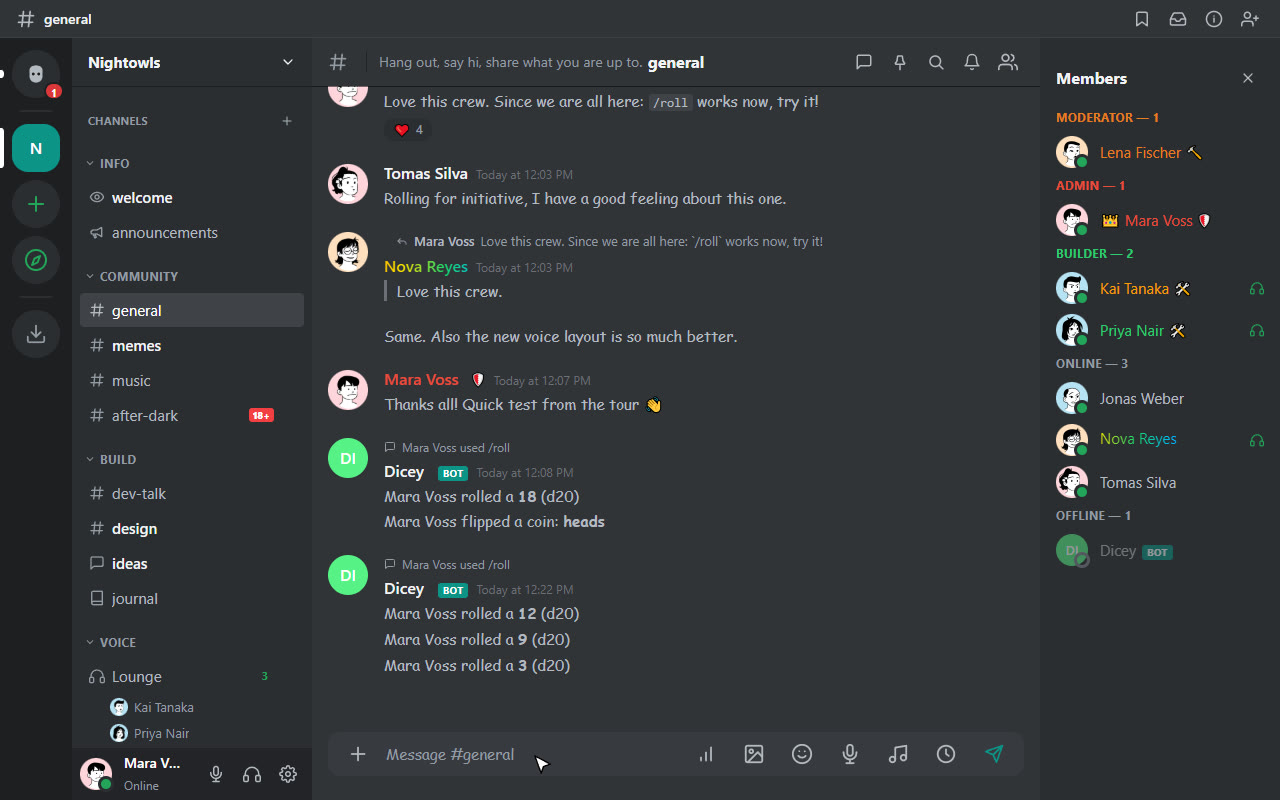
When you press Enter the command goes to the bot, which answers in one of two ways:
- A normal message, posted by the bot and headed "Mara used /roll".
- A private (ephemeral) answer that only you can see. It is shown in the channel with "Only you can see this", is never stored, and disappears when you press Dismiss or reload.
Publishing commands (for bot authors)
A bot needs a token and a working webhook (see Bots, API and webhooks). Only bots with an enabled webhook show up in the popup, because that is how they hear about a use.
PUT /api/bot/commands
Authorization: Bot <token>

{ "commands": [
  { "name": "roll", "description": "Roll a die",
    "options": [
      { "name": "sides", "type": "integer", "required": true },
      { "name": "note", "type": "string" } ] },
  { "name": "whisper", "description": "Only you see the answer",
    "options": [ { "name": "text", "type": "string", "required": true } ] } ] }
The call replaces the whole list. Rules: at most 25 commands with 10 options each; names use a-z, 0-9, _ and - up to 32 characters; option type is string (default), integer or boolean; required options must come first.
Receiving a use
The webhook gets an event of type command:
{ "type": "command",
  "bot": { "id": 3, "userId": 41, "username": "dicey" },
  "server": { "id": 1, "name": "Nightowls" },
  "channel": { "id": 7, "name": "general", "type": "public" },
  "user": { "id": 5, "username": "mara", "displayName": "Mara Voss" },
  "command": "roll",
  "options": { "sides": 20, "note": "raid boss" },
  "interaction": { "id": "9f2c...", "expiresAt": "2026-10-19T12:00:00.000Z" } }
Options arrive already converted to their types, and the server has checked that required ones are present.
Answering
POST /api/bot/interactions/<interaction id>/respond
Authorization: Bot <token>

{ "content": "You rolled a 17", "ephemeral": false }
Set "ephemeral": true for a private answer. An interaction is valid for 15 minutes and takes at most five answers, so a bot can send an acknowledgement and a follow-up.
A complete example
import http from 'node:http';
const TOKEN = process.env.BOT_TOKEN, BASE = 'https://chat.example.com';

http.createServer((req, res) => {
  let body = '';
  req.on('data', (c) => (body += c));
  req.on('end', async () => {
    res.end('ok');                       // answer the webhook first
    const event = JSON.parse(body);      // verify the signature in real code
    if (event.type !== 'command' || event.command !== 'roll') return;
    const n = 1 + Math.floor(Math.random() * event.options.sides);
    await fetch(`${BASE}/api/bot/interactions/${event.interaction.id}/respond`, {
      method: 'POST',
      headers: { Authorization: `Bot ${TOKEN}`, 'Content-Type': 'application/json' },
      body: JSON.stringify({ content: `${event.user.displayName} rolled a ${n}` }),
    });
  });
}).listen(3000);
Limits
- Commands work in server channels, not in threads or DMs.
- A member needs permission to send messages in the channel, and must not be timed out or held back by a verification level.
- Using commands is limited to 10 per 10 seconds per person.